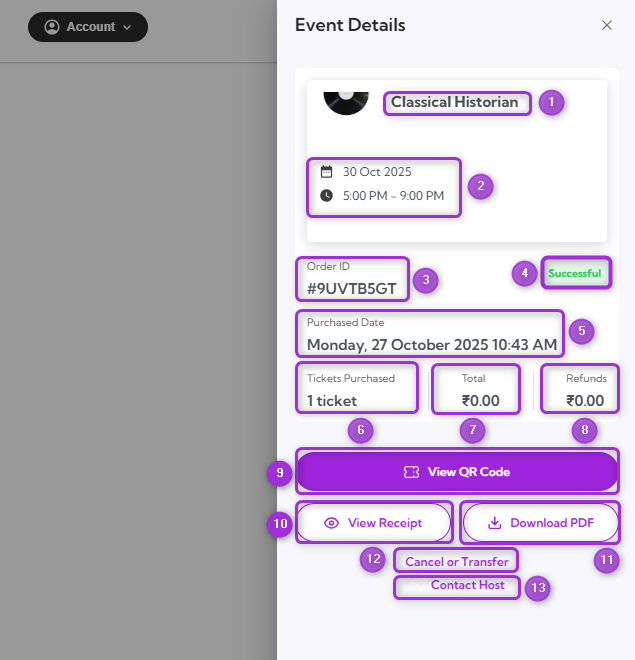
| 1. | Event Name | Displays the full event title to confirm which event the tickets belong to. |
| 2. | Date and Time | Shows the exact date and start time of the event. |
| 3. | Order ID | A unique identifier assigned to your ticket purchase. Use this for tracking or contacting support. |
| 4. | Status | Indicates the current ticket order status, such as Successful, Pending, or Cancelled. |
| 5. | Purchase Date | Displays when the ticket order was completed. |
| 6. | Tickets Purchased | Shows the total number of tickets included in the order. |
| 7. | Total | Displays the total amount paid, including any fees or taxes. |
| 8. | Refunds | Shows refund details if any part of the purchase was refunded. |
| 9. | View QR Code | Opens the digital QR code for check-in at the event entrance. |
| 10. | View Receipt | Displays the full purchase summary, including payment and transaction details. |